


Joy: Baby & Parenting Experts
4.341.00 Reviews
App Specs
- Version
- 8.0.0
- Updated On
- License
- Free
- Downloads
- 10,000+
- Developer
- Joy Memories, Inc
- Categories
- Parenting
- Platform
- Android
Screenshots



 Analysis by AppCompare
With a newborn, the trouble is often not remembering that you fed the baby or changed a diaper; it is remembering exactly when, especially when the day has blurred into short naps and interrupted meals. Joy: Baby & Parenting Experts is built around that everyday problem, bringing feeding, sleep, diaper notes, and access to parenting experts into one app. I find that combination appealing because it joins routine record-keeping with a place to turn when a question feels harder than a log entry.
Joy is a free parenting app from Joy Memories, Inc, with optional in-app purchases. It is rated for Everyone, and its current version is 8.0.0. The app has a 4.3 average from 144 ratings and has been installed over 10,000 times. Those figures suggest a useful, established niche rather than a universal must-have. Whether it fits you depends less on the headline promise than on how you handle tracking, advice, and phone connectivity during a busy day.
When a connection matters most
I’d start this section by separating the moments when a quick log is enough from the moments when you’re looking for guidance. That distinction helps set realistic expectations: a record can support a handoff, while a question for an expert calls for a working connection and a different kind of attention. Next, I’ll look at how those needs fit into the small, interrupted windows of a typical day.
Logging is useful only when it fits the moment
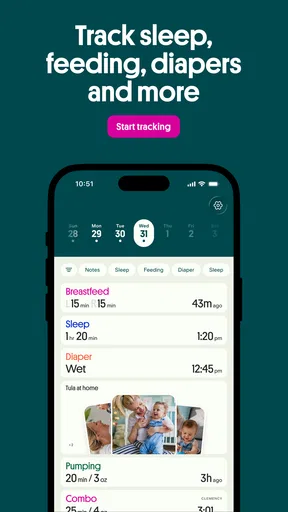
Feed, nap, and diaper tracking is most valuable when recording something takes less effort than trying to remember it later. A quick note after a feed can help you answer practical questions: when did the baby last eat, how long was the nap, or when was the last diaper change? That context can be especially helpful when another caregiver takes over and needs a concise handoff.
Connectivity can shape this routine. A phone may be online when you are at home and less reliably connected during a walk, in a waiting room, or while moving between places. If you expect to enter every event immediately, it is sensible to try the app in the locations where you actually care for your baby before making it the sole record. I would also keep a simple fallback, such as a note you can reconcile later, if a missing entry would cause stress.
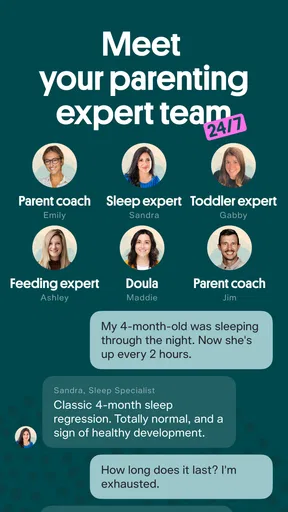
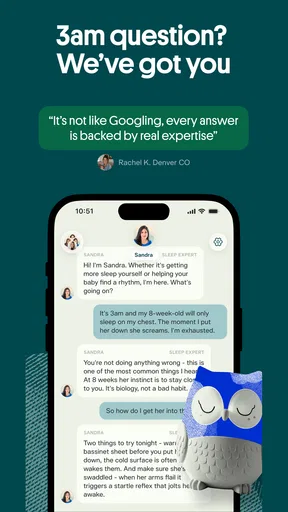
The other online-sensitive part of Joy is its access to parenting experts. That can be valuable when a question comes up at an inconvenient hour, but it is a different kind of benefit from tracking: an expert conversation depends on being able to reach the service, while a feeding or sleep log is only helpful if the record is available when you need it. I would treat expert support as a convenient resource, not as a substitute for urgent medical care or emergency services.
Use it around real caregiving handoffs
A practical way to judge the app is to test one ordinary handoff. Imagine you have been up with the baby overnight, and your partner is taking the next shift. A record of recent feeds, naps, and diaper changes can reduce the “I think it was about…” conversation. The benefit is not sophisticated analysis; it is a shared reference point that helps both adults start from the same facts.
Worth Reading Before You Choose

EA SPORTS FC Mobile 26 Is a Bigger Football Game, but It Takes Time

Flipboard Shows What News Apps Must Do Beyond the Feed

Switching to Android Auto Means Rethinking Your Driving Routine

Google Calendar Makes a Crowded Week Easier to Manage

Ludo King Makes the Most of the Minutes Between Plans

Baby Panda World Brings Quick Play to Modern Phones, but Its Game Library Feels Busy
For that workflow to work, decide together what counts as worth logging. One caregiver may want every nap recorded, while another may find that level of detail burdensome. Agreeing on a lightweight routine—record the main events and add a note only when something is unusual—can make a tracker more sustainable. The best system is the one both people will keep using, not the one with the most entries.
Joy’s focus makes it a better fit for families who want baby-care records alongside a route to parenting guidance than for people looking only for a general household organizer. If you already track everything in a notes app or a spreadsheet, switching is worthwhile only if the dedicated categories and expert access make the extra app easier to use than your current habit.
On the move: quick checks, tired hands, and interruptions
A phone check that feels easy at home can be awkward during a stroller walk, in a busy waiting room, or while you’re settling the baby. I’ll focus on how to keep Joy’s role modest and repeatable in those settings, including when waiting until a natural pause is wiser than trying to record everything immediately. That practical approach leads into what to do when a routine is interrupted.
Keep the interaction simple enough to repeat
Parenting apps are used in imperfect conditions: one hand may be occupied, attention may be divided, and a reminder to log an event can arrive long after it happened. I would evaluate Joy less like a polished dashboard and more like a pocket notebook. Can you make the entry you need without turning a two-second task into a chore? Does the layout make sense when you are tired? Those are the questions that decide whether it becomes part of the routine.
A useful non-obvious approach is to avoid trying to reconstruct a whole day at bedtime. If you miss an entry, add only what you can confidently recall and leave uncertain details out rather than creating a false sense of precision. A tracker is helpful when it reflects reality; filling gaps with guesses can make the record less trustworthy for the next caregiver or conversation with a professional.
Another sensible workflow is to use the app for recurring basics and reserve longer notes for changes that matter. For example, a routine feed may need only a time and the relevant log category, while an unusual nap pattern or a question you want to raise with an expert may deserve a brief note. This keeps the record readable instead of turning it into a stream of indistinguishable entries.
Joy may also be less convenient if you prefer to keep your phone away during caregiving or deliberately minimize screen use around your child. In that case, consider logging at natural pauses rather than checking the app after every event. If that delay makes you anxious or causes you to forget entries, a paper note near the changing area may be a better capture tool, with the app used only when you want a more organized record or expert help.
Advice and tracking serve different needs
The expert element gives Joy a broader purpose than a basic baby log, but it also calls for realistic expectations. A tracker can organize what happened; a conversation can help you think through what to do next. For non-urgent questions, having both in one parenting app may feel convenient. For symptoms or situations that need immediate attention, use appropriate clinical or emergency support rather than waiting for an in-app response.
I would also be deliberate about what you share in any expert conversation. Describe the concern clearly and stick to details that help answer it. Families differ in how comfortable they are discussing personal matters through an app, so the convenience of reaching support should be weighed against your own comfort with digital communication.
When something goes wrong, keep the record useful
A gap in a log does not have to make the rest of the record useless. I’ll consider ways to resume without guessing, so the timeline remains an honest aid rather than a claim of perfect recall. This matters especially when another caregiver is taking over and needs to know which details are certain and which still need checking.
Have a recovery habit, not a perfect streak
Any app used around feeding and sleep can become frustrating if a missed session makes the whole record feel ruined. I recommend treating the log as a practical aid, not a scorecard. If the phone is unavailable, the network is unreliable, or you simply forget, continue with the next entry you can make confidently. A partial but honest timeline is often more useful than abandoning the tracker after one imperfect day.
For a shared-care routine, a small handoff note can bridge interruptions: record the most recent event you know for certain and tell the next caregiver what remains unclear. This is a more dependable recovery method than assuming the app contains every detail. It also prevents a technical hiccup from becoming a disagreement about what happened.
Before relying on any digital log for an important discussion, open it and check that the entries you expect to see are present. That basic habit is worthwhile whether the app is used at home or on the go. If the record appears incomplete, explain the uncertainty rather than presenting estimates as exact times. The point is to support better conversations, not to create a false impression of certainty.
Paid options and the right level of commitment
Joy is free to download, with in-app purchases ranging from $17.99 to $99.99 per item. I would begin by deciding what you need from the free experience before considering a purchase. If your main goal is to track routine events, use the app long enough to see whether the habit sticks. If expert access is the reason you are interested, check the purchase details in the app and make sure the offered option suits your expected use before paying.
This is a meaningful trade-off: a free starting point lowers the barrier to trying the tracker, while the range of optional purchases means not every part of the experience should be assumed to be included at no cost. For a parent who only wants a simple log, a familiar notes app may be enough. For someone who values a dedicated parenting space and intends to make use of expert support, paying may be easier to justify—but only if the specific option matches that need.
Version 8.0.0 is the current release, and the app was released on August 13, 2024. I would keep it updated through the normal app-store process, especially when using it for a daily record, and make sure the phone itself is accessible during the moments when you expect to log an event. That is ordinary good practice, not a promise that an update or connection will prevent every interruption.
Who will get the most from Joy?
The right fit depends on whether you want a focused baby-care record, a place to seek parenting guidance, or both—and how comfortable you are relying on a phone for those tasks. I’ll weigh that combination against simpler alternatives and the habits it asks you to maintain. That should make it easier to decide whether Joy belongs in your routine or whether another approach suits your household better.
A focused helper, not a replacement for every tool
Joy is a strong candidate for new parents and caregivers who want feeding, naps, and diaper changes gathered in one place, with parenting experts available as another reason to open the app. It may be particularly useful when care is shared across adults, because a common timeline can reduce repeated questions and help each person understand what has already happened.
It is less compelling for someone who dislikes recording routine details, wants a tracker that works entirely on paper, or needs one app to coordinate a much wider set of family tasks. It may also be the wrong choice if reliable access to an expert conversation is central to your plan but you cannot comfortably depend on your phone and network in the places where questions arise. In those situations, a direct care provider, a paper log, or a simple existing note-taking method may serve you better.
Against the usual alternatives, Joy sits between a bare-bones log and a broader parenting resource. A notes app is flexible and familiar, but it asks you to create your own structure and offers no built-in expert component as part of that basic workflow. A dedicated tracker can make routine entries feel more organized, while Joy’s combination may appeal if you value records and guidance together. The trade-off is that a specialized app adds another account and habit to maintain, and its optional purchases may not suit every budget.
My verdict on the connected experience
I see Joy as most useful when you have a repeatable routine: log the key care events, check the timeline at handoff, and turn to expert support for questions that are appropriate for that channel. Its value comes from lowering the mental load of remembering—not from making parenting predictable. Connectivity matters most for reaching help and keeping a digital routine convenient, so I would test it in your everyday settings and keep a low-tech fallback for interruptions.
With a 4.3 average and more than 10,000 installs, Joy has drawn interest from parents looking for this mix of tracking and support, though those figures alone cannot tell you whether its workflow matches yours. My recommendation is to try the free app with one clear purpose for a few days: make caregiver handoffs easier, or organize your own notes. If you find yourself opening it naturally, it may earn a place in your routine. If logging becomes another demand, simplify the process or choose a lighter alternative. Joy works best as a practical companion, not as a source of pressure to record every moment.
Pros
- Offers expert guidance for pregnancy
- baby care
- and early parenting questions.
- Lets parents get support without having to travel to an appointment.
- Can help users feel more prepared during unfamiliar stages of parenting.
- Provides a convenient way to seek advice when questions come up.
- May complement
- but not replace
- guidance from a family's healthcare provider.
Cons
- Advice quality and usefulness can vary depending on the expert you consult.
- Expert sessions may require payment or a subscription.
- Availability of specialists may depend on your location and time zone.
- Online guidance cannot assess a baby in person or handle emergencies.
- Some parents may prefer private
- face-to-face conversations for sensitive concerns.
FAQs for Joy: Baby & Parenting Experts
What is Joy: Baby & Parenting Experts, and who is it for?
Joy is a parenting app designed to help expectant parents and families with young children find practical guidance and support. Depending on the features available in your region, it may offer expert-led content, parenting resources, and ways to connect with specialists. It is best viewed as an informational companion rather than a replacement for advice from your child’s pediatrician or another qualified healthcare professional.
What kinds of advice and resources can I find in the app?
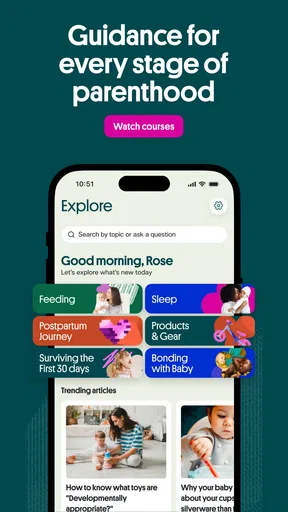
The app focuses on topics connected to pregnancy, babies, and early parenting. Resources may cover common questions about a child’s development, everyday care, and family wellbeing, with guidance from parenting or health experts. The selection can change over time and may differ by location, account type, or app version, so check the app’s current description and available sections to confirm which topics and services are offered to you.
Is Joy free to download, and does it include paid features?
Joy may be available to download without an upfront charge, but some content, consultations, subscriptions, or other services could require payment. Pricing and what is included can vary by country and may change, so review the app’s store listing and any in-app purchase details before signing up. If you start a subscription, check its renewal terms and cancellation instructions in the relevant app store.
Can Joy replace advice from a pediatrician or provide urgent medical help?
No parenting app should be treated as a substitute for a child’s doctor, diagnosis, or emergency care. Joy’s resources may help you understand general topics and prepare questions, but they cannot necessarily assess your child’s individual needs. For urgent symptoms or an immediate safety concern, contact local emergency services or a healthcare provider. For ongoing concerns, speak directly with your pediatrician or another qualified clinician.
What should I know about privacy before using Joy?
Parenting apps may ask for information such as an email address, account details, or information about pregnancy and a child’s development to personalize the experience. Before entering sensitive details, read Joy’s privacy policy and the data disclosures shown in the app store. Check what information is collected, how it may be used or shared, and whether you can manage your account, permissions, or stored data.


